
GED

Official documents in the right version, with control and traceability

Centralize policies, procedures, and manuals with versioning, validity, categories, mandatory reading, and electronic signature in the same environment as corporate communication.

Versioning with diff • Per-category validity • Mandatory reading with signature • QR codes for physical access

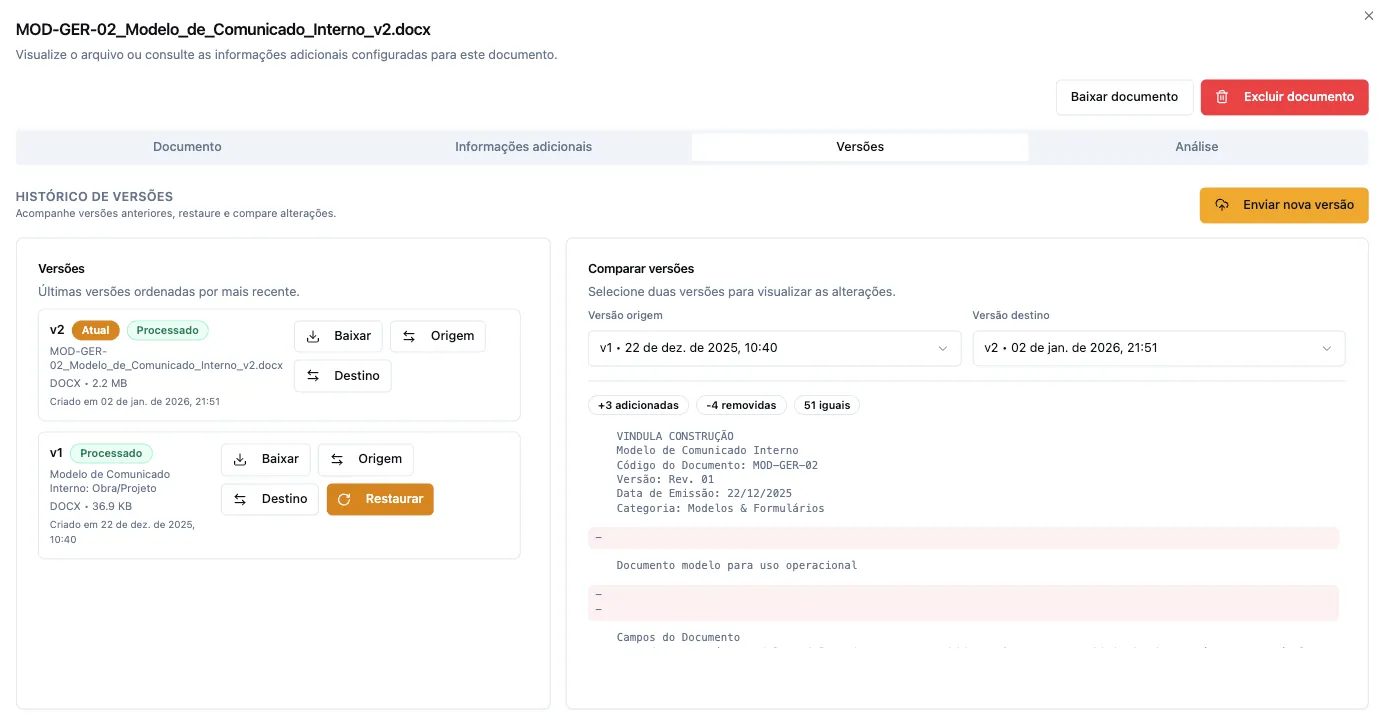
Version history in Vindula document management

Version control with accessible history inside the official document environment.

Module capabilities

What the document management module includes

See the capabilities that are part of the module and enter document management routines.

Documents and categories

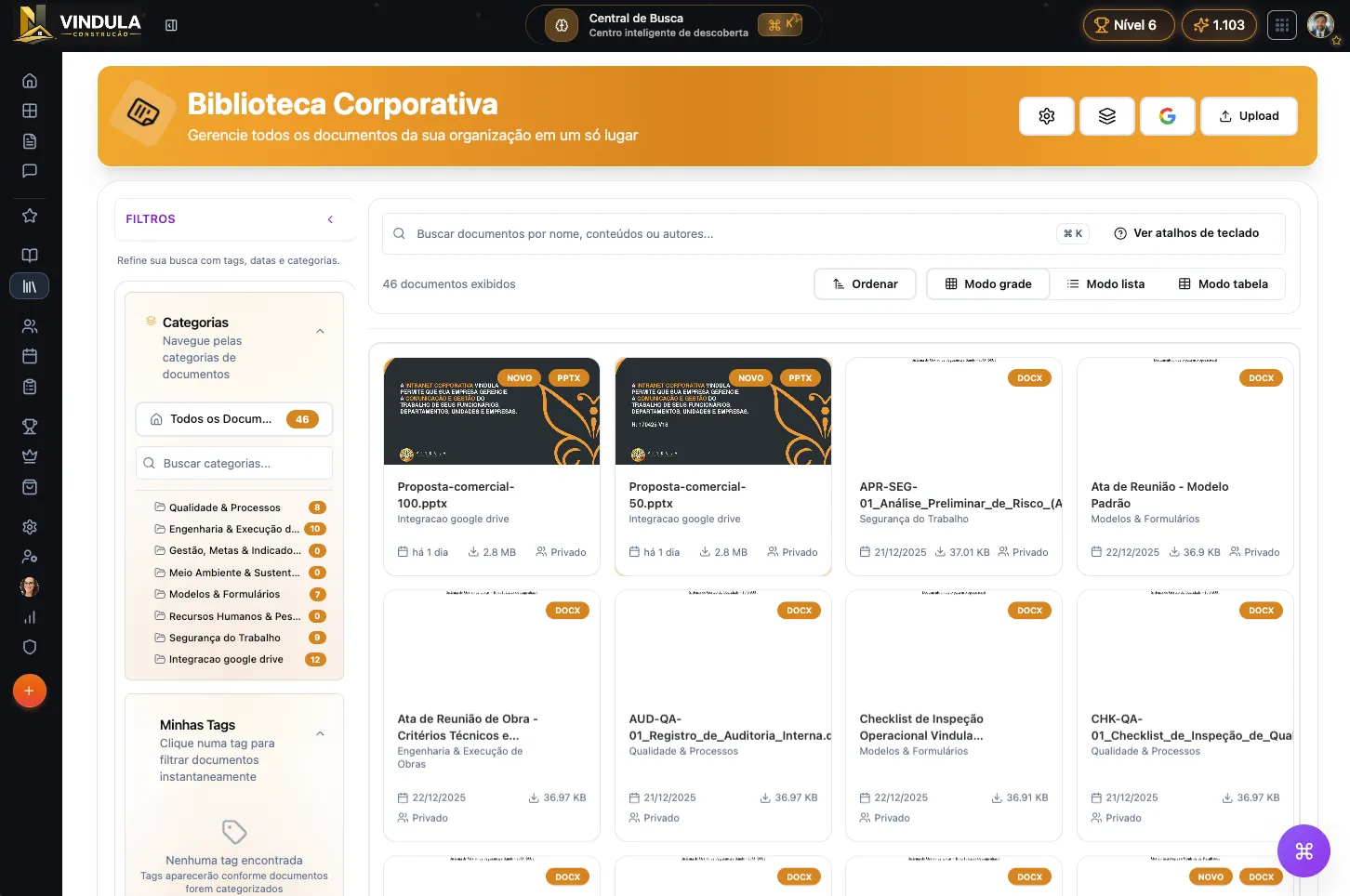
Centralize official documents with hierarchical categories, custom fields, tags, and automatic preview in the same environment.

  • Upload and automatic processing

    Document upload with PDF conversion, preview generation, cover creation, and text extraction for indexing.

  • Hierarchical categories

    Category tree with settings inheritance, validity, target audience, and post-processing per level.

  • Custom fields

    Per-category fields with automatic schema resolution, used for record mode and AI extraction.

  • Color-coded tags

    Visual markers for free classification, filterable in search and record mode.

  • Curated collections

    Internal landing pages with selected documents, manual ordering, and shareable URL by slug.

  • Preview and viewer

    Internal viewer for PDF, video, and audio with temporary access tokens validated by RLS.
Versioning and history

Version control with diff, restore, and accessible history for each official document.

  • Version history

    Each version recorded with number, date, author, size, and automatic processing status.

  • New version upload

    New version insertion with automatic processing and optional AI post-processing flag.

  • Side-by-side diff

    Version comparison with LCS algorithm, insertions, deletions, and change summary.

  • Restore version

    Creation of a new version from any previous version, copying content and metadata.

Validity and notifications

Global or per-category validity policy with advance warning, access blocking, and update audit.

  • Global and per-category policy

    Simple mode (author only) or composite mode (author + departments, teams, users) with configurable duration and lead time.

  • Expiry notification

    Automatic alert with configurable advance days per company, considering timezone.

  • Expiry blocking

    Expired documents can have download blocked or access fully restricted per policy.

Mandatory reading and signature

Reading obligations with progress tracking, electronic signature, and evidence audit.

  • Reading obligations

    Link documents to obligations with deadline, recurrence, priority, and target audience by department, team, or user.

  • Progress tracking

    Progress from 0 to 100% per obligation, with time spent and transition between pending, in progress, and completed.

  • Electronic signature

    Methods: simple, password-based, quiz, 2FA, or button confirmation, all with IP logging and audit.

  • Report export

    Progress report exportable in CSV and XLSX with filter by audience, deadline, and status.

QR Codes and physical access

QR codes for physical document access with PIN protection, temporary tokens, and grouped hubs.

  • Per-document QR generation

    SVG QR for printing, with public access via URL and PIN or token validation.

  • QR Hubs

    Grouping of multiple documents and links into a single QR, with manual ordering and creation from collections.

  • Protection and control

    Token and PIN renewal, rotation, and revocation with policy per company, category, or document.

Search and OCR

Search by OCR-extracted text, AI-powered semantic search, and answers with citation from the original document.

  • Text extraction (OCR)

    Automatic processing that extracts and indexes textual content from PDFs and images for search.

  • Semantic search

    Meaning-based search using embeddings, available within the content of each document.

  • AI answers with citation

    Automatic answer generation with citation from the original excerpt and prompt injection guardrails.

Integrations

Bidirectional sync with Google Drive and Microsoft SharePoint with change detection and automatic import.

  • Google Drive

    OAuth authentication, folder-to-category sync with automatic import and versioning.

  • Microsoft SharePoint

    OneDrive and SharePoint support with folder browsing, sync, and dedicated import pipeline.

Operational control

What the team starts controlling day to day

The value of document management is not just in archiving. It is in keeping the right version, validity under control, and reading evidence when operations require it.

Centralize official documents in hierarchical categories with custom fields and filterable tags.

Control version, validity date, responsible owner, and accessible history of each official document.

Compare versions side-by-side with automatic diff and restore any previous version as a new version.

Configure global or per-category validity policy with advance warning and access blocking on expiry.

Link documents to reading obligations with deadlines, electronic signature, and progress report export.

Generate QR codes for physical access with PIN protection, grouped hubs, and expiry policy.

Search content within documents by OCR, semantics, and get AI answers citing the original excerpt.

Sync Google Drive and SharePoint folders with document categories, with automatic import and versioning.

Best fit

Where this module usually makes the most sense

The gain appears faster when operations depend on official version, controlled validity, and reading evidence.

01

Internal policies with version and validity

When teams need to consult the correct document without doubt about validity and current version.

02

Procedures with formal updates

When critical changes need clear history of what changed, when it took effect, and who approved.

03

Physical documents with QR Code

When documents need to be accessed in the field, construction site, or plant without relying on outdated printed copies.

04

Reading and acknowledgment with evidence

When audits require reading receipts, electronic signatures, and progress exports.

FAQ

What usually comes up in document management conversations

Objective questions to align expectations about the module and what it actually delivers today.

What features are included in Vindula's document management module?

The module brings together upload with automatic processing, hierarchical categories with custom fields, tags, versioning with diff and restore, global and per-category validity policy, record mode, mandatory reading with electronic signature, QR codes with PIN protection, OCR and AI semantic search, Google Drive and SharePoint integration, and curated collections.

What is record mode in the document module?

It groups documents by the value of a custom field, such as CPF, contract number, or process ID. The panel shows records on the left and documents per record on the right, with facets for tags and types, and sensitive field masking.

How does document validity work?

There is a global policy per company (simple or composite) and per-category overrides. Each document inherits the policy or gets its own configuration with start date, end date, and advance warning days. On expiry, download can be blocked or access fully restricted per policy.

Does document management connect with mandatory reading and signature?

Yes. Documents can be linked to reading obligations with deadlines, priority, and target audience. The platform tracks progress from 0 to 100%, logs time spent, and allows electronic signature with varied methods (password, quiz, 2FA, button). The progress report is exportable in CSV and XLSX.

Does the module replace SharePoint or Google Drive?

No. The document module integrates with Google Drive and SharePoint via bidirectional folder-to-category sync. Existing documents can be automatically imported with versioning. The difference is governance: validity, mandatory reading, signature, and record mode do not exist in native drives.

How does document management implementation start?

The rollout can start from the main problem: centralizing official documents with versioning and validity. Then, as needed, connect mandatory reading, signature, QR codes, and integrations. The module works together with communication, HR, and training when the company needs it.

Want to see how document management enters your process?

The guided demo shows versioning, validity, mandatory reading, and QR codes in the real context of your official documents.