HR platform

Human Resources in the flow of work, with governance

Centralize org structure, employee records, absences, vacations, payslips, and internal journeys in the same environment where communication, documents, and training already live.

Org structure • Employee records • Absences, vacations, and payslips • Signature when needed

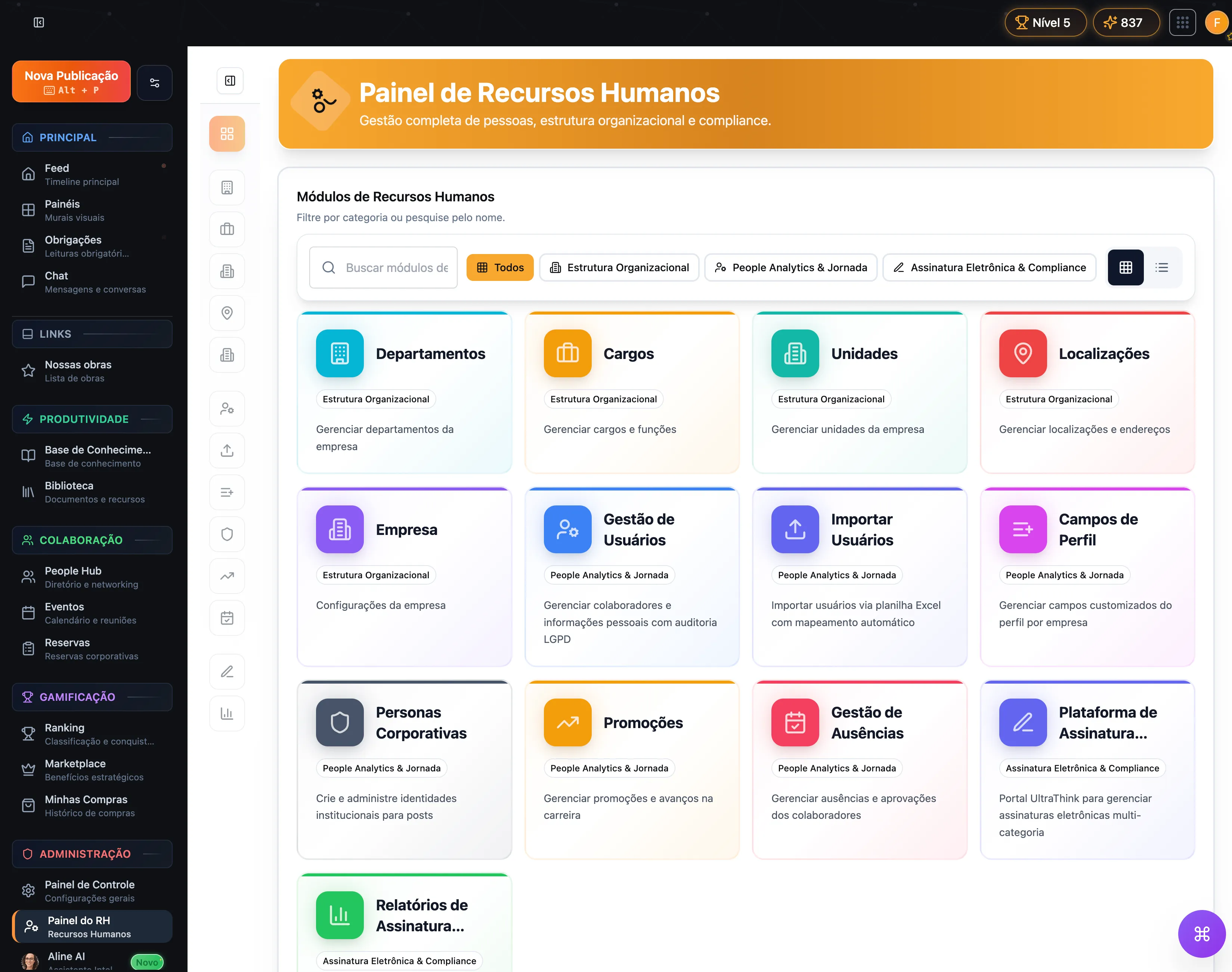
Vindula Human Resources dashboard

Dashboard with HR structure, journey, and compliance modules.

Module capabilities

What the Human Resources module includes

See the capabilities that are part of the module and enter HR’s day-to-day routine.

Organizational structure

The base to organize company, areas, and units before publishing, training, or managing journeys.

  • Company

    Core company structure settings.

  • Departments

    Organization of business areas that publish, receive, and approve content.

  • Job titles

    Roles used for segmentation and people records.

  • Units

    Branches, plants, job sites, and other operational units.

  • Locations

    Addresses and physical contexts tied to operations.

  • Directory and org chart

    Lookup for leaders, teams, backups, and department members.

People records, journey, and record mode

Resources to organize people records, movements, employee files, and HR routines without parallel controls.

  • User management

    People records and maintenance with organizational context.

  • Import users

    Bulk import by spreadsheet with field mapping.

  • Profile fields

    Custom fields per company to reflect the real operation.

  • Absence management

    Requests, approvals, and absence history.

  • Vacations

    Vacation requests and tracking with history.

  • Employee record files

    Electronic employee file by employee ID or another identifier, grouping documents in record mode.

  • Promotions

    Tracking of promotions and internal movements.

HR documents and signature flows

Recognizable HR flows such as payslips, income statements, and vacation documents enter with dedicated categories, processing, and signature when needed.

  • Payslips

    Batch upload, PDF splitting, AI-based structured extraction, and advanced electronic signature with public document validation.

  • Income statements

    Dedicated category for annual HR documents with fiscal-year competence and controlled employee release.

  • Vacation and other HR documents

    Vacation, term, and contract flows can follow dedicated categories, signature deadlines, and formal process history.

  • Reports and validation

    Dashboard to track pending items, access times, signed documents, and public validation by document and code.

LGPD, consent, and privacy requests

Company and employees operate the LGPD portal in the same environment: one side publishes terms and processes requests; the other tracks consents, requests, and exports.

  • Administrative LGPD dashboard

    Tracking privacy requests by status, treatment queue, and processing history on the company side.

  • Employee LGPD portal

    Area where employees can view requests, consents, exports, and settings tied to their corporate data.

  • Data rights requests

    Flows for access, rectification, deletion, portability, restriction, objection, and consent withdrawal.

  • Consent terms

    Creation, editing, publishing, and control of active and required terms for internal audiences.

  • History and pending acceptance

    Consent history, grant or revoke actions, and automatic modal when a term is still pending.

  • Data export

    Request and download of structured exports, including consent history, inside the employee portal.

HR communication and identity

Resources for HR to publish with institutional identity and keep a standardized presence in internal and external channels.

  • Corporate personas

    Institutional identities for official HR publications.

  • Automated welcome flows

    Messages and entry journeys for new hires.

  • Email signatures

    Per-employee corporate template with HTML and image output, preview, and centralized signature updates.

Operational control

What HR starts controlling day to day

The module’s value is not only in people records. It is in organizing structure, journeys, and HR routines without separating the team from the rest of operations.

Organize company, units, locations, departments, and job titles in the same environment.

Register and import people with employee ID, hire date, employment type, and profile fields.

Organize the employee’s electronic file by employee ID or another identifier, without relying on physical folders.

Track absences, vacations, and movements with clearer history.

Publish payslips, income statements, and vacation documents with signature and validation when the flow requires it.

Receive and process employee privacy requests with progress history and status per request.

Publish consent terms, track pending acceptance, and keep consent history and exports in the same flow.

Keep leaders, teams, and org chart visible to the people who need to operate.

Publish welcome content and official HR communications without another parallel flow.

Distribute standardized email signatures per employee in HTML or image format, with centralized template management.

Connect HR to documents, learning paths, and evidence when the process requires it.

Best fit

Where this module usually makes the most sense

The gain appears faster when operations require structure, history, and context for different audiences.

01

Multi-unit operations

When HR needs to organize structure, leadership, and audiences across several units.

02

Field teams, job sites, plants, and shifts

Especially useful when workers do not operate all day inside corporate email.

03

Frequent hires and internal moves

When entry, movement, and people record updates need standards and visibility.

04

Flows that require history and evidence

When the company needs clear visibility into what was registered, approved, read, or signed.

FAQ

What usually comes up in HR conversations

Objective questions to align expectations about the module and what it actually delivers today.

What features are included in Vindula’s HR module?

The module brings together org structure, people management and import, profile fields, directory and org chart, electronic employee files in record mode, absences, vacations, promotions, automated welcomes, corporate personas, email signatures, signable HR document flows, and the LGPD portal for company and employees.

Does the module also help with LGPD for employees and HR?

Yes. On the company side, Vindula brings together an administrative dashboard for privacy requests and consent-term management. On the employee side, there is a portal to track requests, consent history, pending acceptance, and corporate data exports.

Does the module support payslips, income statements, and vacation documents?

Yes. The e-signature platform works with dedicated categories for payslips, vacations, income statements, terms, and contracts. In the payslip case, the flow includes automatic processing, structured data extraction, and public validation of the signed document.

What is record mode for employee files?

It is the use of record mode to organize the employee’s electronic file by employee ID or another identifier. Instead of searching physical folders or loose documents, HR finds files grouped by person, with search and history in the same environment.

Does the HR module replace payroll, time tracking, or recruiting?

No. The module is focused on HR operations with organizational structure, people records, internal journeys, absences, vacations, and governance. Payroll, time tracking, and recruiting are not part of this offer.

Can the project start only with people records, absences, or onboarding?

Yes. The rollout can start from HR’s main problem today and later connect to communication, documents, training, and evidence when it makes sense.

How does HR connect with communication, documents, and training?

When HR needs to publish to the right audience, the platform uses segmented communication. When it needs official documents, it uses document management. When it needs journeys, onboarding, or learning paths, it uses training. When it needs to formalize payslips, vacations, terms, or statements, it uses the e-signature flow. When it needs to handle consent and employee requests, it uses the LGPD portal. The gain comes from not splitting these flows across isolated systems.

Want to see how this fits into your HR routine?

The guided demo starts from your HR team’s main problem and shows which modules should enter first in your real scenario.